Now in early access

Your whole day,
in driving order.

CurbsideWorks plans the route, runs the day on your phone, and logs every service as you go.

Free under 25 customers · $29/mo solo · $49/mo for the whole crew.
No per-seat, per-route or per-pool charges.

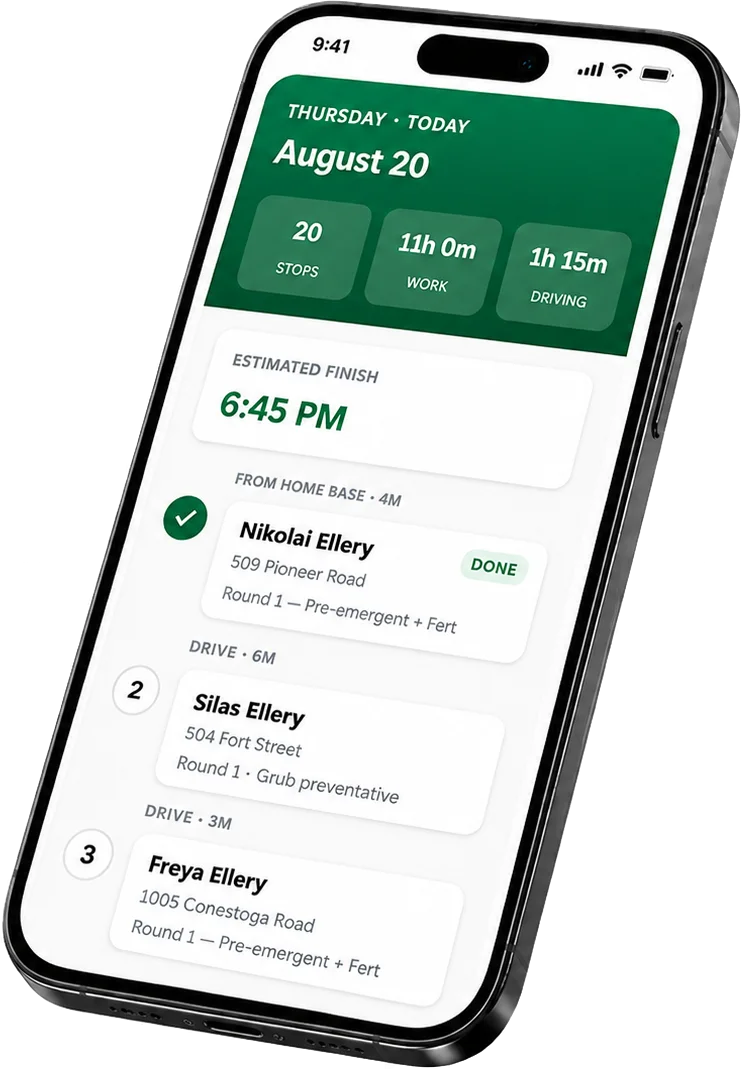
A phone running the CurbsideWorks day view for Thursday, August 20: twenty stops, eleven hours of work, one hour fifteen minutes driving, an estimated finish of 6:45 PM, then the route in driving order — Nikolai Ellery at 509 Pioneer Road marked done, six minutes to Silas Ellery at 504 Fort Street, three minutes to Freya Ellery at 1005 Conestoga Road.

The problem

The software you're using
charges you for growing.

Every tool in this market meters something you can't avoid buying more of — a seat, a truck, a pool — then charges you again the day you grow.

Heads up: these are their prices, not ours

Jobber charges

$39 → $119

The first-hire cliff

What the most popular option costs the day you take on one employee. GorillaDesk charges per route instead, so a third truck triples that bill.

Jobber charges

+$47/mo

Routing sold separately

These started as invoicing tools and added routing later. One charges extra for it; RealGreen buries it in a plan starting near $200.

Cloud-only tools

No signal

Dead zones stop the app

Jobber, GorillaDesk and Skimmer all quit halfway down a rural road. The ones that do work offline want a contract and a setup fee.

CurbsideWorks is $29 a month, flat — and it stays $29 when you hire. See our pricing →

How it works

Four steps. That's the product.

Set it up once, then most weeks are two taps: generate, and go.

  1. Load your book

    Add customers and what they're on — every 45 days, every other Thursday, twice a season. Addresses get pinned automatically.

  2. Fill the week

    One tap schedules everything that's come due. Press it twice and nothing doubles up.

  3. Order the day

    Stops sequence by real road drive time, out from your shop and back — with a finish time before you leave.

  4. Work the route

    Tap to navigate. Arrived. Tick off what you did. Complete. It moves you to the next stop.

Why it's different

Built around the route,
not the invoice.

See the whole week before you commit to it

Every day shows its stop count, its workload and its drive time. You find out a 21-stop Thursday won't fit while you can still move something — not at 6pm standing in someone's yard.

  • Real road drive times, not straight lines
  • Finish-time estimate for every day
  • Learns how long each property actually takes
curbsideworks.com/schedule
Dashboard Schedule Customers Services Settings

This week

Aug 17 – Aug 21

79STOPS
25DONE
54LEFT
43hEST. TIME
Mon

0 stops

Tue

18 stops

Wed

20 stops

Thu

20 stops

Fri

21 stops

Built for where the signal isn't In build now

Dead zones are why this is the build in progress rather than a someday item. The day's route, addresses, gate codes and notes will live on the phone, so you can log in airplane mode and let it sync once you're back in range.

  • Full route cached before you leave — in build
  • Completions queue and sync automatically — in build
  • No app store — it installs from a link

Your spray records, done as you work

Licensed applicators have to keep per-application records for state audits. CurbsideWorks captures product, rate, area and conditions at completion, then exports the report.

It's the feature that otherwise forces you onto software costing ten times as much.

Who it's for

If the work repeats
at the same addresses.

CurbsideWorks isn't a lawn app with other trades bolted on. It's built around what these businesses share: the same stops, on a rhythm, from a truck.

Lawn & fert4–6 rounds a season
Pest controlMonthly · quarterly
MosquitoEvery 3 weeks in season
Pool serviceWeekly, fixed day
MowingWeekly · biweekly
Pet wasteWeekly routes
Bin cleaningTrash-day routes
Window & gutterQuarterly rounds

Compare

What you actually pay.

Published prices as of August 2026. The second row is the one that matters.

CurbsideWorksJobberGorillaDeskSkimmerRealGreen
Starts at$29/mo$39/mo$49/mo$49/mo minQuote only
When you growStays flat$119 at first hirePer route — ×3 trucksPer pool, rate doubled$300–600/mo typical
Route optimizationCore featureBasicIncludedIncludedPaid add-on
Works offlineIn buildNoNoNoYes
Application recordsIncludedNoOn $99 tierReadings onlyYes
Setup feeNoneNoneNoneNone~$995
ContractNoneNoneNoneNoneOne year

Competitor figures from their own published pricing and current customer reports. Plans change — check theirs before deciding, and check ours too.

Pricing

Costs less than one mow.

Two months free if you pay yearly. No card to start.

Starter

$0

Up to 25 customers. Nothing held back in the field.

  • Route optimization
  • Recurring programs
  • Week & month planning
  • Service history
Start free
Most operators

Solo

$29/mo

Unlimited customers, for the one-truck operation.

  • Everything in Starter
  • Unlimited customers
  • Application records
  • Customer emails
  • Invoicing
Get early access

Crew

$49/mo

Add the whole team. The price doesn't move.

  • Everything in Solo
  • Unlimited crew members
  • Assign days and stops
  • A route per tech
  • Owner dashboard
Get early access

Where the product actually is

Straight with you, because you'd find out anyway. CurbsideWorks is in early access and built in the open.

  • Working now: customers and services, recurring programs, week and month planning, drive-time route ordering, the full field flow with timing, and service history.
  • Next: offline logging, crew accounts, completion emails to customers, application records.
  • Deliberately not built: photos and text messaging. Both cost real money to run and nobody has asked yet. When early customers do, they get built.

Early access means a lower price locked for life and a direct line to the person writing the code. See the full build status and what you're signing up for →

Stop paying more for growing.

Load your customers and see your first optimized day in about ten minutes.

Get early access